
TAOSOFT CONTENT UN/INSTALLER
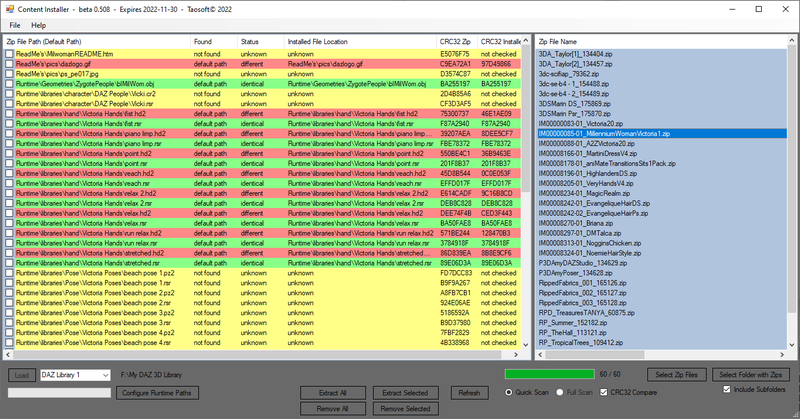
For Windows 7, 8, 10 and 11 - NET 4.6.2 - (not tested on Windows 7 and 11, but should work).
- Full or partial (selected files) install or update of files from any zipped product
- Full or partial (selected files) uninstall of files from any installed product, provided you haven't modified the file or folder structure after installation
- Compare zip content with installed files to check if any installed files are missing or are different from the one in the zip (fast CRC 32 checksum compare)
Note 1: you need to have the original zip files for the products you want to uninstall, modify or check, in order to use this program.
Note 2: the current version may leave some empty folders behind when uninstalling, this will be fixed in next version. Temporary fix in version 0.509 - click the "Remove Empty Folders" button after removing files. This will scan the whole selected library for empty folders so may take a while, so wait with doing it until you have uninstalled everything you want to uninstall.
Note 3: currently single threaded so with many or large files in the zip installation may take a long time, like several minutes, where it goes into "Not Responding" mode, so be patient, it's not necessarily crashed.
Download beta 0.509: continst-0509.zip
Just unzip to a folder and run .exe file (do not place folder in Program Files/Program Files (x86), that may cause problems).
VIDEO TUTORIAL
COPYRIGHT © 3D CONTENT MANAGERS 2025